
In order to cancel your hosting account with Wild Root Web, please follow these directions:
1. Log into your client area.
2. Click on the "Services" drop down and choose "My Services".
3. Click the service you would like to cancel to be redirect to the Product Details page.
4. On the left hand side bar, find the "Actions" heading and click the "Request Cancellation" link.
5. Describe the reason for your request, choose your time frame and submit by pressing the "Request Cancellation" button.
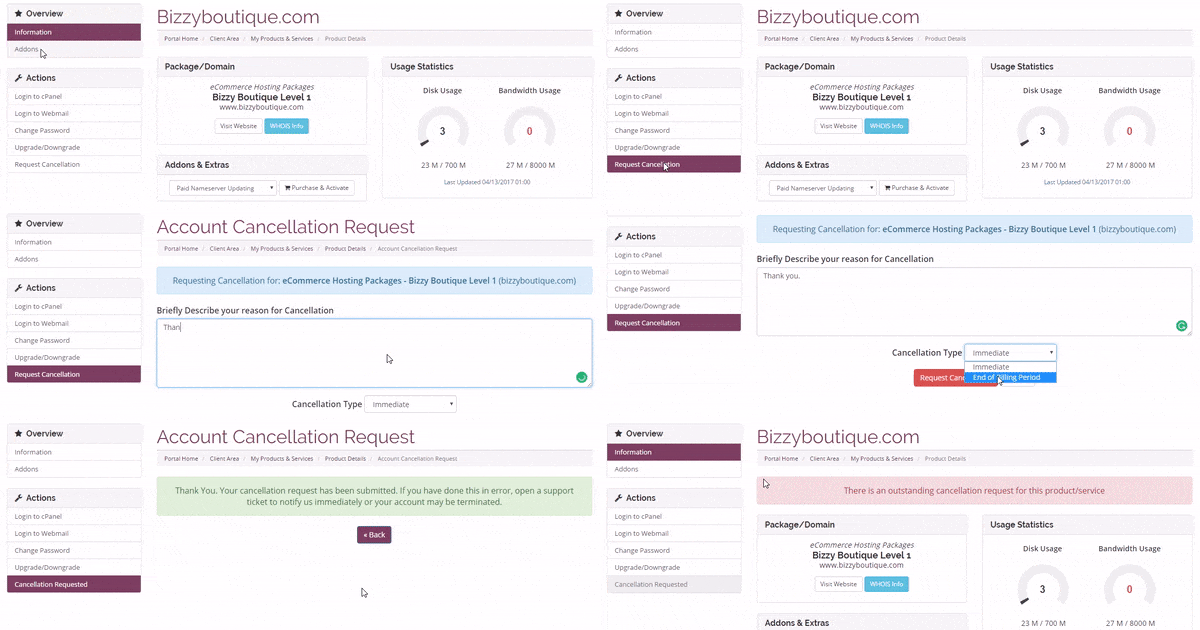
Your request will be processed in the order received.
Note- please be aware of our refund policy prior to requesting your account cancellation. Refunds do not include any domain, set-up, online store builder lease/purchase, or web design fees ever, or any hosting fees after the first 30 days of service. Please review our Terms for complete refund details.
If you have any questions about cancelling your account, or about our refund policy, please contact us prior to cancelling your services to discuss.
Last Updated: 07/29/2019